
From within the Game
To submit a personal data request in-game:
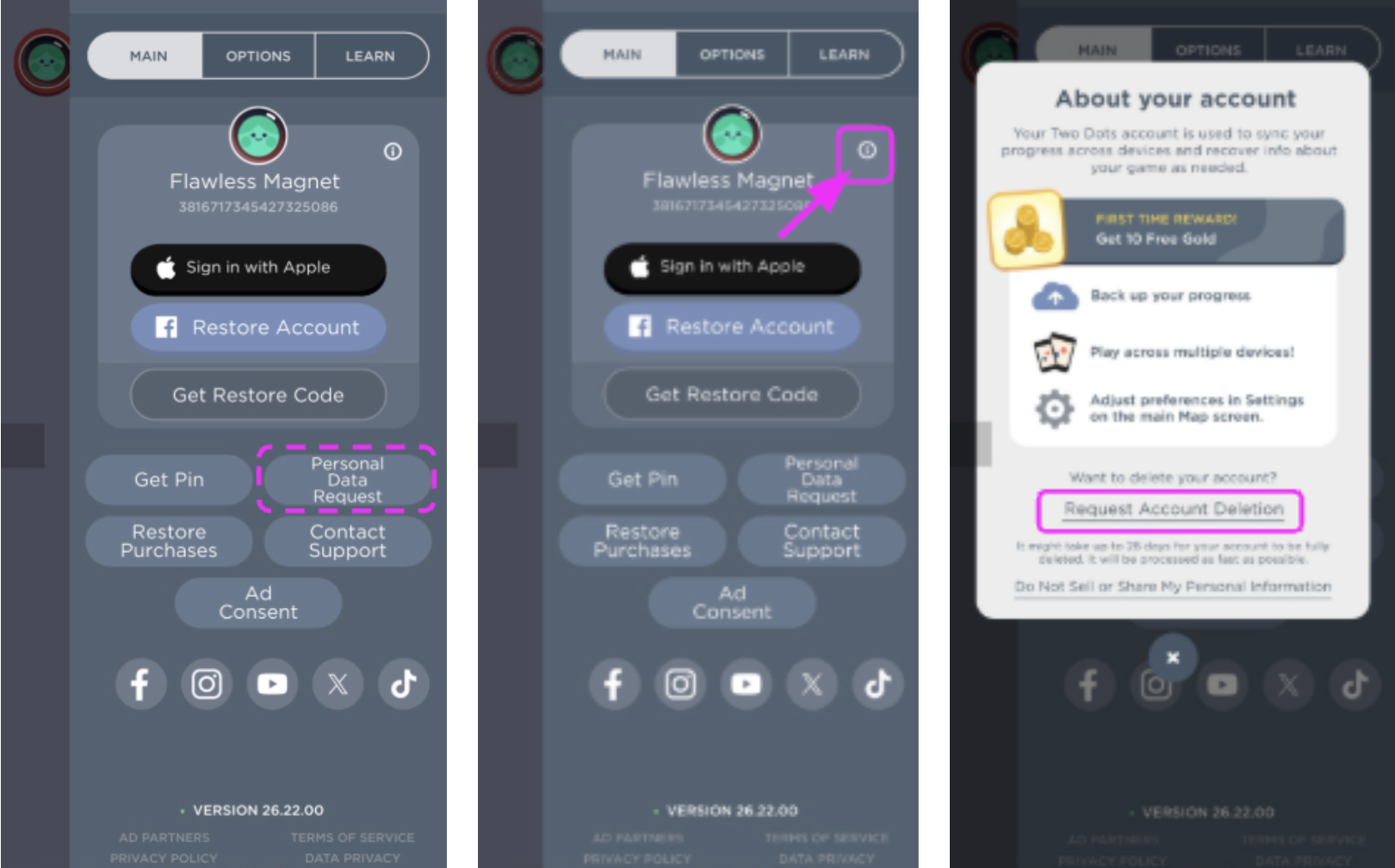
Tap the Settings cogwheel (top right on the Map).
For data requests: Select “Personal Data Request”.
For account deletion: Tap the Information (i) icon next to your account name > “Request Account Deletion” > confirm.
Follow the prompts to complete your request via the Personal Data Request Portal.
Through Personal Data Request Portal
Visit the Personal Data Request Portal directly. Log in Using your Player ID and PIN (found in your game settings).
For instructions, refer to the portal guide, here.
What data is collected?
Please review our Privacy Policy for full details.
How long does it take?
Data copies typically take a few hours to a few days.
Deletion requests are processed within 30 days.
How will I be notified?
You’ll receive an email once the process is complete. You can also check your status in the portal.
Can I cancel a deletion?
Yes. You have 7 days to cancel by logging into the Portal with your Player ID and PIN.